Understanding regression (and statistics) through predictive modeling
The way we usually report statistics for our data is inferential. Predictive or generative modeling is usually left for machine learning, deep learning, LLMs. For this tutorial predictive and generative mean the same thing. However, many statistics have an underlying predictive or generative model. The ability of your model to predict or generate data is tightly related to how well you can draw inferences from your model. If your model does not fit your data well then the effect sizes and p-values are meaningless. The type of predictions we are related to but not the same as those use for machine learning and other predictive techniques. We want to use predictive modeling to ensure our models fits well so that our inference is correct. I have found that understanding the predictive features of regression models helps you understand how regression models actually work. The nice thing is that we can don’t have to do fancy math but, can instead rely on visual comfirmation and intuation which you can later use to build your mathematical intuition of linear regression. We will use two datasets in this chapter; one is the data used in the current clamp chapter from MSNs and the other is a behavioral dataset that I have found very useful for showing the importance of predictive accuracy in inference. We will start with behavioral data.
Source
from pathlib import Path

import matplotlib.pyplot as plt
import numpy as np
import pandas as pd
import statsmodels.api as sm
import statsmodels.formula.api as smf
from lithos import CategoricalPlot, LinePlot
from scipy.stats import norm

rng = np.random.default_rng(seed=42)

data = pd.read_csv(Path().cwd().parent / "data/stats/regression_as_generative.csv")
data["con_log"] = np.log10(data["consumption"])
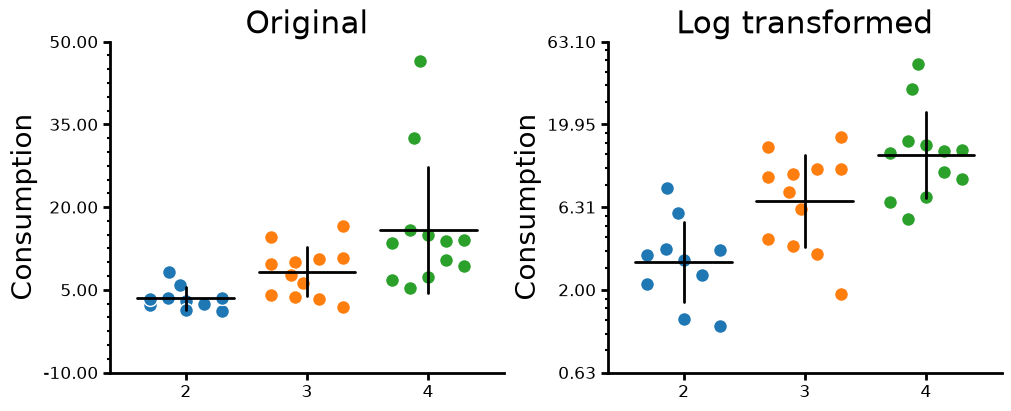
First we are going to look at the behavioral data. The dataset is consumption of a substance split across different cohorts and subgroups. Consumption is bounded by 0 and can go to infinity.When data is bounded at 0 and goes to infinity, you have a high chance of having log normal data. There are other distributions that are bounded that you can see in the (distributions chapter)[#distributions]. One thing about this dataset is that it is based on real data but I synthesized. First we will plot the raw data and the log transformed data side by side. One thing you may notice in the raw data is that as the mean value gets larger that variance also gets larger. This is a key sign that your data is not normally distributed by instead a non-normal distribution. In many cases this will be the lognormal distribution. Since this dataset is based on a real dataset the relationship is not perfect. You will notice that log transforming the data rescales the data so that there is non relationship between the mean and variance. This is another good sign that the data is lognormal. Also is does not matter what base log you use to transform the data. The rescaling is the same but the end values will be different.
Source
fig, ax = plt.subplots(ncols=2, figsize=(10, 4), layout="constrained")
plot = (
    CategoricalPlot(data)
    .grouping(group="Cohort")
    .plot_data(y="consumption", ylabel="Consumption", title="Original")
    .jitter(markersize=10, width=0.6)
    .summary(barwidth=0.8, err_func="std")
    .axis(ydecimals=2)
    .axis_format(yminorticks=5)
    .plot(figure=fig, axes=ax[0])
)
plot = (
    CategoricalPlot(data)
    .grouping(group="Cohort")
    .plot_data(y="consumption", ylabel="Consumption", title="Log transformed")
    .transform(ytransform="log10", back_transform_yticks=True)
    .jitter(markersize=10, width=0.6)
    .summary(barwidth=0.8, err_func="std")
    .axis(ydecimals=2)
    .axis_format(yminorticks=5)
    .plot(figure=fig, axes=ax[1])
)
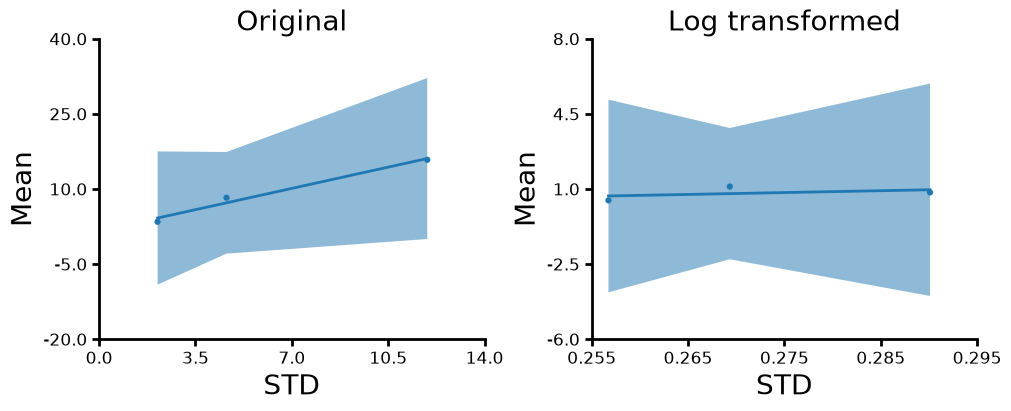
Lets look the the relationship between the variance and mean for the both the orginal values and log rescaled values. Also it is important to note that we are log transforming the data before we get the mean and standard .deviation for the log transformed data. We can see that there is a slope for the untransformed data but not for the log transformed data.
Source
f = data.groupby(["Cohort"], as_index=False).aggregate(
    consumption_mean=("consumption", "mean"),
    consumption_std=("consumption", "std"),
    con_log_mean=("con_log", "mean"),
    con_log_std=("con_log", "std"),
)
fig, ax = plt.subplots(ncols=2, figsize=(10, 4), layout="constrained")
plot = (
    LinePlot(f)
    .plot_data(
        "consumption_mean",
        "consumption_std",
        title="Original",
        ylabel="Mean",
        xlabel="STD",
    )
    .scatter()
    .fit()
    .plot(figure=fig, axes=ax[0])
)
plot = (
    LinePlot(f)
    .plot_data(
        "con_log_mean",
        "con_log_std",
        title="Log transformed",
        ylabel="Mean",
        xlabel="STD",
    )
    .scatter()
    .fit()
    .axis(xdecimals=3)
    .plot(figure=fig, axes=ax[1])
)
Next we are going to run a regression on the dataset for the original and log transformed (log10) data. Due to the structure of the experiment we will using something called difference coding for cohort contrast. This is due to how the experiment was run using stepwise changes how the substance was given to the mice (dose and duration of exposure). We will use sum to zero contrast coding for sex. One thing to note is that you get significant p-values using each model however, what really matters is how well each model fits which p-values and even effect sizes may not show us.
Original data
formula = "consumption ~ C(Cohort, Diff)"
rawmodel = smf.ols(formula, data=data).fit()
print(rawmodel.summary())
OLS Regression Results
==============================================================================
Dep. Variable: consumption R-squared: 0.320
Model: OLS Adj. R-squared: 0.276
Method: Least Squares F-statistic: 7.300
Date: Wed, 07 Oct 2026 Prob (F-statistic): 0.00252
Time: 21:04:23 Log-Likelihood: -116.08
No. Observations: 34 AIC: 238.2
Df Residuals: 31 BIC: 242.7
Df Model: 2
Covariance Type: nonrobust
========================================================================================
coef std err t P>|t| [0.025 0.975]
----------------------------------------------------------------------------------------
Intercept 9.1733 1.326 6.920 0.000 6.470 11.877
C(Cohort, Diff)[D.2] 4.8083 3.297 1.458 0.155 -1.917 11.533
C(Cohort, Diff)[D.3] 7.5754 3.144 2.410 0.022 1.163 13.988
==============================================================================
Omnibus: 34.413 Durbin-Watson: 2.217
Prob(Omnibus): 0.000 Jarque-Bera (JB): 97.271
Skew: 2.266 Prob(JB): 7.55e-22
Kurtosis: 9.937 Cond. No. 2.97
==============================================================================
Notes:
[1] Standard Errors assume that the covariance matrix of the errors is correctly specified.
Log model
When using the formula API in StatsModels you can either pretransform the data or pass in a numpy function. I show both formulas below but using the numpy function method.
formula = "con_log ~ C(Cohort, Diff)"
formula = "np.log(consumption) ~ C(Cohort, Diff)"
logmodel = smf.ols(formula, data=data).fit()
print(logmodel.summary())
OLS Regression Results
===============================================================================
Dep. Variable: np.log(consumption) R-squared: 0.496
Model: OLS Adj. R-squared: 0.463
Method: Least Squares F-statistic: 15.23
Date: Wed, 07 Oct 2026 Prob (F-statistic): 2.47e-05
Time: 21:04:23 Log-Likelihood: -30.937
No. Observations: 34 AIC: 67.87
Df Residuals: 31 BIC: 72.45
Df Model: 2
Covariance Type: nonrobust
========================================================================================
coef std err t P>|t| [0.025 0.975]
----------------------------------------------------------------------------------------
Intercept 1.8590 0.108 17.156 0.000 1.638 2.080
C(Cohort, Diff)[D.2] 0.8530 0.270 3.165 0.003 0.303 1.403
C(Cohort, Diff)[D.3] 0.6337 0.257 2.466 0.019 0.110 1.158
==============================================================================
Omnibus: 0.163 Durbin-Watson: 1.498
Prob(Omnibus): 0.922 Jarque-Bera (JB): 0.377
Skew: 0.014 Prob(JB): 0.828
Kurtosis: 2.485 Cond. No. 2.97
==============================================================================
Notes:
[1] Standard Errors assume that the covariance matrix of the errors is correctly specified.
Predicted data from the model
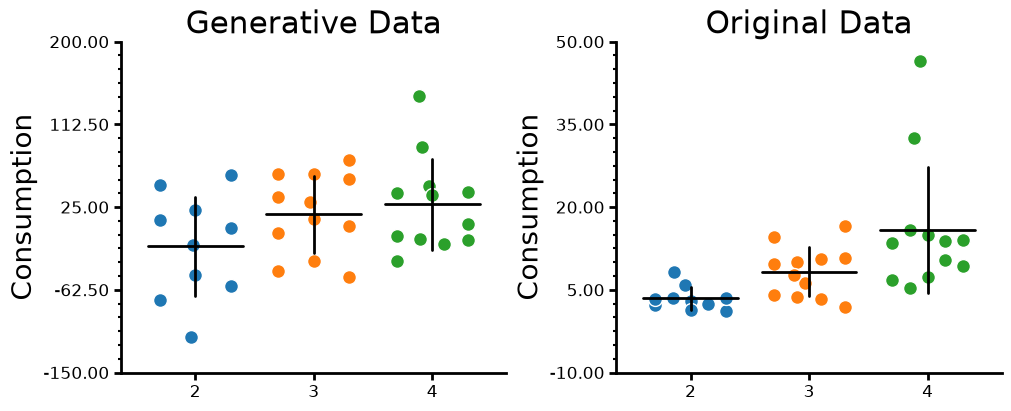
Next we are going to predict the data from each model using our original values as input. The closer the predicted values the better our regression models fits the data. The indirect way to view the predictions of your model is through the residuals. However, once you get into GLMs, residual analysis is less clear and sometimes uninterpretiable. There are packages out there like (DHARMa)[https://
Untransformed data model
pred_probs = rawmodel.predict(data)
raw_model_predictions = pd.DataFrame(
    {
        "predicted": rng.normal(loc=pred_probs, scale=rawmodel.scale),
        "Cohort": data["Cohort"],
    }
)
fig, ax = plt.subplots(ncols=2, figsize=(10, 4), layout="constrained")
plot = (
    CategoricalPlot(raw_model_predictions)
    .grouping(group="Cohort")
    .plot_data(y="predicted", ylabel="Consumption", title="Generative Data")
    .jitter(markersize=10, width=0.6)
    .summary(barwidth=0.8, err_func="std")
    .axis(ydecimals=2)
    .axis_format(yminorticks=5)
    .plot(figure=fig, axes=ax[0])
)
plot = (
    CategoricalPlot(data)
    .grouping(group="Cohort")
    .plot_data(y="consumption", ylabel="Consumption", title="Original Data")
    .jitter(markersize=10, width=0.6)
    .summary(barwidth=0.8, err_func="std")
    .axis(ydecimals=2)
    .axis_format(yminorticks=5)
    .plot(figure=fig, axes=ax[1])
)
Transformed data
To get the correct values back out of a log transformed model we need to “back transform” the data to the original scale. For natural log you can just exponentiate with np.exp and for log10 you can use 10**data (where data is your data). When log tranforming a variable and then back tranforming the result you can get smearing. To correct for smearing we need to the variance of the gaussian distribution underlying the model which can be access by logmodel.scale and do np.exp(predictions)*np.exp(logmodel.scale/2). Basic smearing without normally distributed errors we can using Duan’s Smearing estimator which using the residuals directly np.mean(np.exp(logmodel.resid)) do np.exp(predictions)*np.mean(np.exp(logmodel.resid)). We will use the simple correction since is generally works well enough.
pred_probs = logmodel.predict(data)
logmodel_predictions = pd.DataFrame(
    {
        "consumption": np.exp(rng.normal(loc=pred_probs, scale=np.sqrt(logmodel.scale)))
        * np.exp(1 / 2 * logmodel.scale),
        "Cohort": data["Cohort"],
    }
)
fig, ax = plt.subplots(ncols=2, figsize=(10, 4), layout="constrained")
plot = (
    CategoricalPlot(logmodel_predictions)
    .grouping(group="Cohort")
    .plot_data(y="consumption", ylabel="Consumption", title="Generative Data")
    .jitter(markersize=10, width=0.6)
    .summary(barwidth=0.8, err_func="std")
    .axis(ydecimals=2)
    .axis_format(yminorticks=5)
    .plot(figure=fig, axes=ax[0])
)
plot = (
    CategoricalPlot(data)
    .grouping(group="Cohort")
    .plot_data(y="consumption", ylabel="Consumption", title="Original Data")
    .jitter(markersize=10, width=0.6)
    .summary(barwidth=0.8, err_func="std")
    .axis(ydecimals=2)
    .axis_format(yminorticks=5)
    .plot(figure=fig, axes=ax[1])
)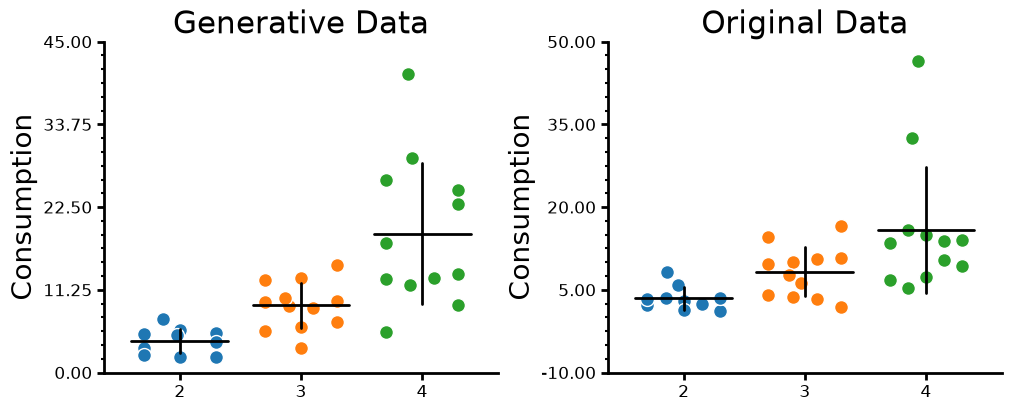
You see that the untransformed model predictions look nothing like the original data. You even get negative values which cannot occur in the dataset because mice cannot consume negative amounts of stuff (very scientific stuff). The predicted values from the transformed model look almost perfect (they will be more perfect than IRL since that data is partly synthetic). We can very closely model the original data by a simple log transform. Now when it comes to interpreting how much the predictors change the outcome the interpretation of the regression coefficient can change. However, if you do post-hoc effectsize testing (like you should be), then you don’t have to worry about interpreting coefficients on a different scale. Package like marginaleffects (Python, R) and emmeans/emslopes (R) are good packages to use.
Diving deeper
Now to go a little bit deeper. You may have noticed that the OLS model above has a single variance parameter. We are going to cover why this is important because is gets to a fundamental part of OLS and even GLMs however, GLMs are more complicated so we will start with OLS. A fundamental aspect of OLS is that there is a linear relationship between the predictor and the outcome. The variables we have do not have to be normally distributed but the relationship between them must be linear but, the noise must be linear. If we want to create a synthetic simple linear regression we can do the following: create a linear range of numbers, multiply by the slope, add an intercept and finally add gaussian noise or gaussian error. OLS expects gaussian error/noise. So what does this look like? At every point along the line we have a gaussian distribution. We imagine each point has its own gaussian distribution center what the true mean would be however, we can technically there is a gaussian distribution at an infinite number of points. You can see the visualization both ways below.
Source
x = np.arange(20)
m = 2
b = 0
epsilon = 2
y = x * m + b + rng.normal(scale=epsilon, size=x.size)  # Look here
fig, ax = plt.subplots(ncols=2, figsize=(10, 4), layout="constrained")
for i in x:
    pdf_x = np.linspace(
        norm.ppf(0.001, loc=i, scale=epsilon),
        norm.ppf(0.999, loc=i, scale=epsilon),
        100,
    )
    pdf_y = norm.pdf(pdf_x, loc=i, scale=epsilon)
    ax[0].plot(pdf_y + i, pdf_x + i, c="black", alpha=0.5)
ax[0].plot(x, x * m + b, c="magenta")
ax[0].plot(x, y, ".", c="orange")
ymin, ymax = ax[0].get_ylim()
xmin, xmax = ax[0].get_xlim()
xx = np.linspace(xmin, xmax, 150)
yy = np.linspace(ymin, ymax, 150)

surface = np.zeros((len(yy), len(xx)))
for i, x_i in enumerate(xx):
    surface[:, i] = norm(m * x_i, epsilon).pdf(yy)

im = ax[1].imshow(
    surface,
    origin="lower",
    aspect="auto",
    vmin=0,
    vmax=None,
    cmap=plt.get_cmap("Greys"),
    extent=[xmin, xmax, ymin, ymax],
)
ax[1].plot(x, x * m + b, c="magenta")
ax[1].plot(x, y, ".", c="orange")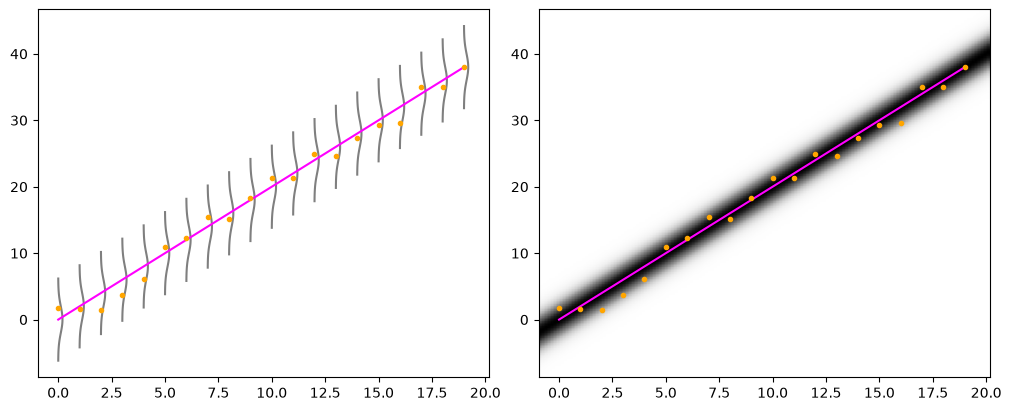
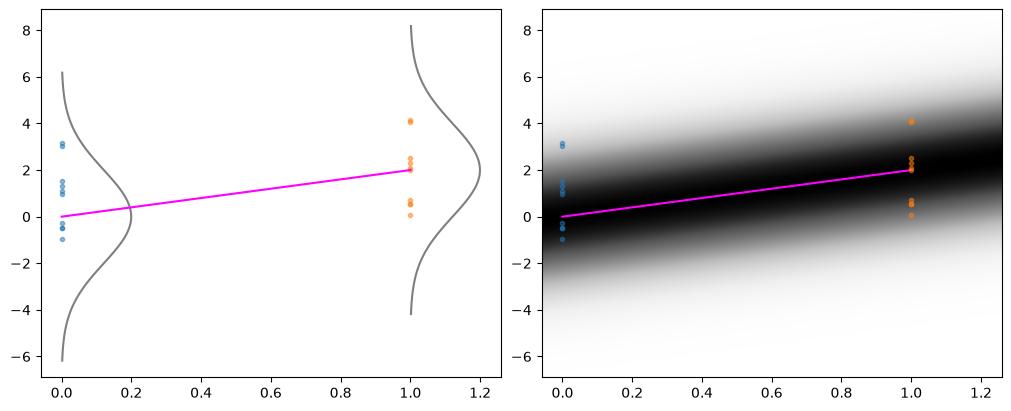
Now you may be asking what about categorical data? Well categorical data is just a special case of linear regression. If you remember from the contrasts section of the regression chapter linear regression can only take numerical values. So we code categorical values into numbers. Then we just run OLS to see what the slope is between the two or more groups. Instead of many points along different parts of the line we have many points at one part of the line. This means that for categorical, each group must gaussian distributed with the close to the same scale for the OLS assumptions to be met. It is also important to note that it gets more complicated when you have more than two groups within a variable or when you have multiple categories with multiple groups which is where interaction effects become important. We can only visualize the assumptions OLS makes for simple models.
Source
x = np.arange(2)
m = 2
b = 0
epsilon = 2
y = x * m + b + rng.normal(scale=epsilon, size=x.size)  # Look here
fig, ax = plt.subplots(ncols=2, figsize=(10, 4), layout="constrained")
for i in x:
    pdf_x = np.linspace(
        norm.ppf(0.001, loc=i, scale=epsilon),
        norm.ppf(0.999, loc=i, scale=epsilon),
        100,
    )
    pdf_y = norm.pdf(pdf_x, loc=i, scale=epsilon)
    ax[0].plot(pdf_y + i, pdf_x + i, c="black", alpha=0.5)
    ax[0].plot(
        np.full(10, i),
        norm.rvs(loc=i, scale=epsilon, size=10, random_state=42),
        ".",
        alpha=0.5,
    )
ax[0].plot(x, x * m + b, c="magenta")
ymin, ymax = ax[0].get_ylim()
xmin, xmax = ax[0].get_xlim()
xx = np.linspace(xmin, xmax, 150)
yy = np.linspace(ymin, ymax, 150)

surface = np.zeros((len(yy), len(xx)))
for i, x_i in enumerate(xx):
    surface[:, i] = norm(m * x_i, epsilon).pdf(yy)

im = ax[1].imshow(
    surface,
    origin="lower",
    aspect="auto",
    vmin=0,
    vmax=None,
    cmap=plt.get_cmap("Greys"),
    extent=[xmin, xmax, ymin, ymax],
)
ax[1].plot(x, x * m + b, c="magenta")
for i in x:
    ax[1].plot(
        np.full(10, i),
        norm.rvs(loc=i, scale=epsilon, size=10, random_state=42),
        ".",
        alpha=0.5,
    )
Further thoughts
If you read the Understanding data chapter, then you know that there are different data types with different bounds. There are times when you do not need to transform your data even when the bounds or type of data (integer only) are not within the gaussian realm. The first case is when your data is bounded from zero to infinity but is a long way from 0. If you use the interactive graph for the log normal distribution you will notice that as the mean increases the distribution almost looks normal. As long as all your data is far from zero you may be able to assume your data is normally distributed.